http://fiveprime.org/flickr_hvmnd.cgi?method=GET&sorting=Interestingness&photo_type=250&page=1&noform=t&search_domain=Tags&photo_number=50&sort=Interestingness&tag_mode=all&textinput=a640,canonpowershot&search_type=Tags
ปีใหม่นี้หวังว่าเราจะถ่ายรูปได้ดีขึ้นน้อ อิอิ
แสดงบทความที่มีป้ายกำกับ a640 แสดงบทความทั้งหมด
แสดงบทความที่มีป้ายกำกับ a640 แสดงบทความทั้งหมด
วันพฤหัสบดี, มกราคม 01, 2552

วันอังคาร, ธันวาคม 23, 2551
… homemade USB camera shutter release …
http://www.cibomahto.com/2008/02/thing-a-day-day-27-remote-trigger-for-powershot-s3/
อันนี้ด้วย http://armanbohn.com/blog/2008/05/22/homemade-usb-camera-shutter-release/
Canon did not include a remote trigger option in this camera, however there are many times when I have wanted one. Recently, though, the CHDK people figured out that you can use the USB port on the camera as a trigger. It’s a great hack- the camera already has hardware to detect when the camera connects to your PC, so they captured that event and made it scriptable. This works well for what I wanted to do, which is to take long exposure shots without disturbing the camera. A potential drawback to this method, however, is that the camera can take up to a second to respond to the trigger. This means it will not be useful for syncing captures to a fast event. There are two parts to this project, building the hardware and getting the CHDK program running on your camera. Some quick instructions are after the break.
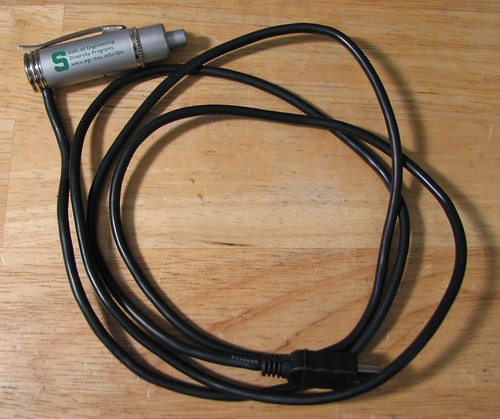
First, the hardware:
อันนี้ด้วย http://armanbohn.com/blog/2008/05/22/homemade-usb-camera-shutter-release/
Canon did not include a remote trigger option in this camera, however there are many times when I have wanted one. Recently, though, the CHDK people figured out that you can use the USB port on the camera as a trigger. It’s a great hack- the camera already has hardware to detect when the camera connects to your PC, so they captured that event and made it scriptable. This works well for what I wanted to do, which is to take long exposure shots without disturbing the camera. A potential drawback to this method, however, is that the camera can take up to a second to respond to the trigger. This means it will not be useful for syncing captures to a fast event. There are two parts to this project, building the hardware and getting the CHDK program running on your camera. Some quick instructions are after the break.
First, the hardware:
This is the schematic we want to achieve: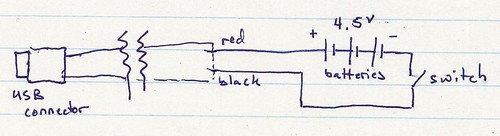
You could build a box and put the components in it, however I found a light-up pen that has all the parts in it. It also occurs to me that something like a mintyboost would also work, if it has a switch to turn the power on and off. Here are the parts before disassembly: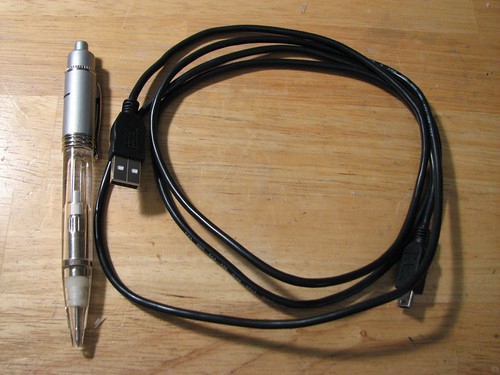
Once the hardware is done, the second part is to get the software set up. I first downloaded the ‘allbest’ build of CHDK from here. The files DISKBOOT.BIN and PS.FIR should be extracted and placed in the root directory of the camera’s SD card (you need a card reader for this). Next, put the card in the camera, and turn it on in play mode (it is important not to go into record mode first). There should be a menu option called ‘update firmware’, select that and agree to everything. This should cause CHDK to load and set up a directory structure on the card. Turn the camera off again, take the card out and put it back in the computer. There should be a CHDK directory on the card now. Copy the following uBasic script to a text file called remote.bas, and save it in the CHDK/scripts/ folder (which should have been created automatically):
The script came from here:
@title Remote button
:loop
wait_click 1
is_key k "remote"
if k=1 then shoot
goto "loop"
end
Now, put the card back in the camera again, and do the firmware load deal again to get the CHDK software running again. CHDK never installs itself on the camera, however there is a way to make it load automatically if you are interested. Get into ALT mode (which assigns different commands to the buttons) by pressing the ‘print’ button on the camera. Once in ALT mode (it should say 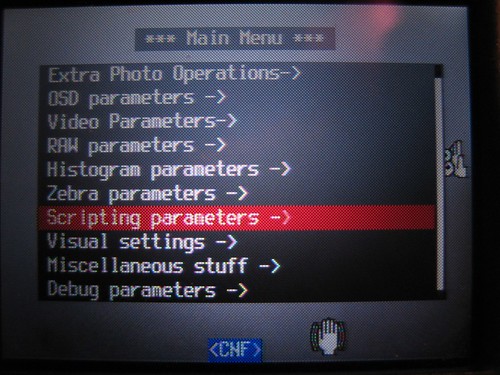
Then select ‘load script from file’, choose the remote.bas script created earlier, and make sure ‘enable remote’ is selected in the scripting menu.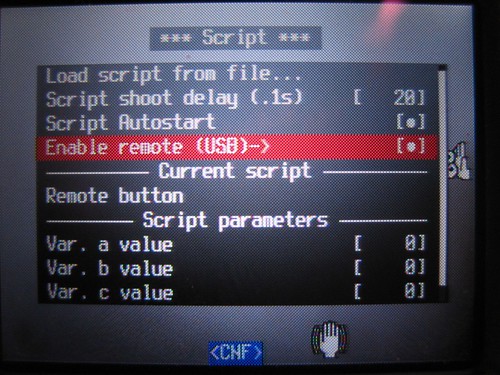
Close the menu and press the shutter button to start the script. If all went well, the screen should look something like mine below. Plug in the remote and press the button to take a picture!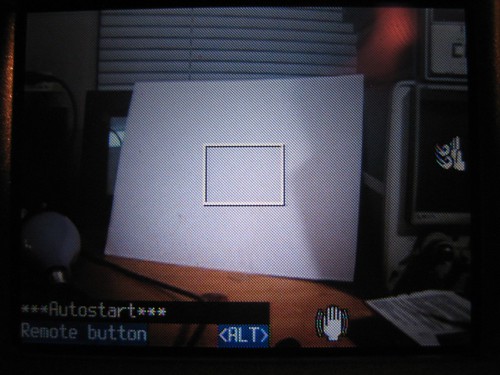
--------------------------------------------------------------------------------
Thanks to someone over on this website, I was able to convert a clicky pen into USB shutter release. It is designed for and works great with my CHDK modified A640.
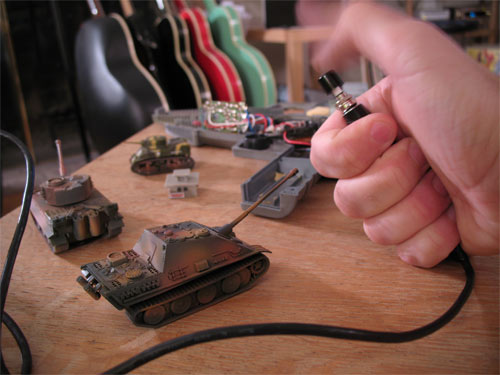
With some electrical tape, my soldering iron, some tin foil, a few batteries and a push button switch, I was able to get this thing working in about an hour.
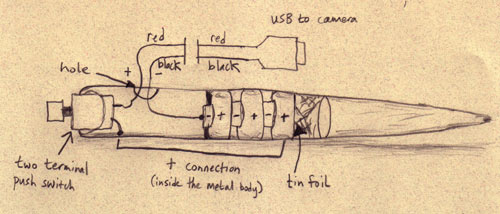
[Note - you have to use a metal pen that conducts on the inside]
I cut the “computer” end off of the USB cable and soldered the black wire to the negative lead of the battery. I smashed some tin foil down in the end of the pen so that the positive side would make contact with the inside of the metal body. This was conected to one side of the push button switch. The other side was connected to the red lead of the cut USB cable.
Now I can shoot controled single frame animation with my 10 mega pixel camera!
I also got my little bunkers and tanks for the “Combat” shoot which is coming up soon!
วันจันทร์, เมษายน 14, 2551
จับสายฟ้า
มีคนเขียนโปรแกรมขึ้นมา ให้กล้องสามารถกดชัตเตอร์เองได้ เมื่อพบความเคลื่อนไหว หรือเมื่อพบฟ้าแลบฟ้าผ่า อิอิ ต้องลอง
แต่ยังใช้ได้กับกล้องไม่กี่รุ่น ดังที่กล่าวมาข้างต้น เมื่อคืนลองกับภาพเคลื่อนไหวแล้ว (เอามือมาไหวๆหน้ากล้อง) โอ้ มันเวิค
แต่ ต้องหาโอกาส ลองจับสายฟ้าต่อไป
อ่านเพิ่มเติม http://chdk.wikia.com/wiki/UBASIC/Scripts/CanonA640:_Motion%2BLightning_Detect
โปรแกรมชื่อ Motion/Lightning Detect
- Written for/on: Canon A640
- Also works on: Other Canon AXXX (Not tested), Canon A720 (tested), Canon A710 (tested), Canon A540 (tested)
แต่ยังใช้ได้กับกล้องไม่กี่รุ่น ดังที่กล่าวมาข้างต้น เมื่อคืนลองกับภาพเคลื่อนไหวแล้ว (เอามือมาไหวๆหน้ากล้อง) โอ้ มันเวิค
แต่ ต้องหาโอกาส ลองจับสายฟ้าต่อไป
อ่านเพิ่มเติม http://chdk.wikia.com/wiki/UBASIC/Scripts/CanonA640:_Motion%2BLightning_Detect
วันอาทิตย์, พฤศจิกายน 04, 2550
remote for s3is and a630, a640, a610, a620, a710
http://hem.passagen.se/fsmmal/chdk2.html
and this http://forums.dpreview.com/forums/readflat.asp?forum=1010&thread=25170969
and this http://forums.dpreview.com/forums/readflat.asp?forum=1010&thread=25170969
Category:Scripts A640 - CHDK Wiki
http://chdk.wikia.com/wiki/Category:Scripts_A640
UBASIC/Scripts/CanonA640: EV Bracketing
UBASIC/Scripts/CanonA640: Flash Bracketing
UBASIC/Scripts/CanonA640: Focus Bracketing
UBASIC/Scripts/CanonA640: ISO Bracketing
UBASIC/Scripts/CanonA640: Interval
UBASIC/Scripts/CanonA640: Interval Video
UBASIC/Scripts/CanonA640: Lightning
UBASIC/Scripts: Scripts for Canon A640
UBASIC/Scripts/CanonA640: Shutter Bracketing
UBASIC/Scripts/CanonA640: Zoom Bracketing
UBASIC/Scripts/CanonA640: Zoom Video
UBASIC/Scripts/CanonA640: EV Bracketing
UBASIC/Scripts/CanonA640: Flash Bracketing
UBASIC/Scripts/CanonA640: Focus Bracketing
UBASIC/Scripts/CanonA640: ISO Bracketing
UBASIC/Scripts/CanonA640: Interval
UBASIC/Scripts/CanonA640: Interval Video
UBASIC/Scripts/CanonA640: Lightning
UBASIC/Scripts: Scripts for Canon A640
UBASIC/Scripts/CanonA640: Shutter Bracketing
UBASIC/Scripts/CanonA640: Zoom Bracketing
UBASIC/Scripts/CanonA640: Zoom Video
วันอาทิตย์, ตุลาคม 14, 2550
วันอังคาร, สิงหาคม 21, 2550
วันจันทร์, สิงหาคม 20, 2550
วันจันทร์, สิงหาคม 13, 2550
วันพุธ, สิงหาคม 08, 2550
วันเสาร์, กรกฎาคม 28, 2550
Can A640 shoot RAW file, show histogram, battery level, etc ?
Yes, It can
คนที่ใช้กล้อง รุ่นดังต่อไปนี้
และล่าสุด G7
จะพบว่า canon ไม่ได้แถมความมสามารถ ในเรื่องดังต่อไปนี้มาให้
Shooting in RAW Live histogram (RGB, blended, luminance and for each RGB channel) Zebra mode (blinking highlights and shadows) DOF-calculator Battery indicator Scripts execution (exposure/focus/... bracketing, intervalometer and more) File browser Text reader Calendar
แต่ตอนนี้เราสามารถใช้มันได้แล้วโดยการเพิ่มโปรแกรมบางตัวเข้าไป sd การ์ดครับ
โปรแกรมอยู่ที่นี่ http://grandag.nm.ru/hdk/
วิธีใช้ คู่มือ ที่นี่ http://scratchpad.wikia.com/wiki/CHDK/HDK_firmware_usage
คำถามที่สงสัย http://scratchpad.wikia.com/wiki/CHDK/FAQ#FAQ
ภาพรวมโปรแกรม http://scratchpad.wikia.com/wiki/CHDK
ไปอ่านเข้าคุยกันเรื่องนี้ http://forums.dpreview.com/forums/readflat.asp?forum=1010&thread=22689965&page=1
และนี่ http://www.s3users.com/forum/showthread.php?t=41)
จบข่าว
คนที่ใช้กล้อง รุ่นดังต่อไปนี้
และล่าสุด G7
จะพบว่า canon ไม่ได้แถมความมสามารถ ในเรื่องดังต่อไปนี้มาให้
แต่ตอนนี้เราสามารถใช้มันได้แล้วโดยการเพิ่มโปรแกรมบางตัวเข้าไป sd การ์ดครับ
โปรแกรมอยู่ที่นี่ http://grandag.nm.ru/hdk/
วิธีใช้ คู่มือ ที่นี่ http://scratchpad.wikia.com/wiki/CHDK/HDK_firmware_usage
คำถามที่สงสัย http://scratchpad.wikia.com/wiki/CHDK/FAQ#FAQ
ภาพรวมโปรแกรม http://scratchpad.wikia.com/wiki/CHDK
ไปอ่านเข้าคุยกันเรื่องนี้ http://forums.dpreview.com/forums/readflat.asp?forum=1010&thread=22689965&page=1
และนี่ http://www.s3users.com/forum/showthread.php?t=41)
จบข่าว
Fix CameraWindow problem ?
วันแรกที่ไดกล้องใหม่มา ลองถ่ายรูปแล้วต่อเข้ากับคอม ปรากฏว่าโปรแกรมCameraWindow ของแคนอนไม่เจอกล้อง แต่สามารถโหลดรูปด้วยการใช้โปรแกรมของวินโดร์เอง เลยคิดว่าสงสัยโปรแกรมไม่อัพเดต จึงทดลองใหม่ด้วยการลงซอฟแวร์ที่ให้มาในกล่องกล้อง ผลเหมือนเดิมคือ โปรแกรมของแคนอนไม่เจอกล้อง เริ่มกลุ้มนิดๆ เพราะอยากจะตั้งชื่อตนเองลงในกล้องโดยผ่านโปรแกรม
วันนี้เลยพึ่งพี่กูเกิ้ลลองหาข้อมูลดูแล้วก็เจอคนที่มีปัญหาคล้ายๆเราและแน่นอนตามมาด้วยทางแก้ไข เย้ในที่สุดก็แก้ไขได้ เลยเอามาลงไว้เผื่อใครใช้โปรแกรม CameraWindow และ ZoomBrowser EX แล้วเจอปัญหาเดียวกัน
แนวทางแก้นะครับ (โปรดทำตามด้วยความระมัดระวัง)
1 - open regedit
2 - goto HKEY_LOCAL_MACHINE\SYSTEM\ControlSet001\Services\C CALib8
3 - double click on DependOnService
4 - delete the second line "SSDPSRV"
5 - close regedit
6 – open up services (start->run>services.msc)
7 – stop the SSDP Discovery Service
8 – restart and done
อ้างจาก http://www.dcresource.com/forums/archive/index.php/t-8365.html
วันนี้เลยพึ่งพี่กูเกิ้ลลองหาข้อมูลดูแล้วก็เจอคนที่มีปัญหาคล้ายๆเราและแน่นอนตามมาด้วยทางแก้ไข เย้ในที่สุดก็แก้ไขได้ เลยเอามาลงไว้เผื่อใครใช้โปรแกรม CameraWindow และ ZoomBrowser EX แล้วเจอปัญหาเดียวกัน
แนวทางแก้นะครับ (โปรดทำตามด้วยความระมัดระวัง)
1 - open regedit
2 - goto HKEY_LOCAL_MACHINE\SYSTEM\ControlSet001\Services\C CALib8
3 - double click on DependOnService
4 - delete the second line "SSDPSRV"
5 - close regedit
6 – open up services (start->run>services.msc)
7 – stop the SSDP Discovery Service
8 – restart and done
อ้างจาก http://www.dcresource.com/forums/archive/index.php/t-8365.html
วันพฤหัสบดี, กรกฎาคม 26, 2550
สมัครสมาชิก:
บทความ (Atom)